Slow AI pipelines aren’t caused by the model—they’re caused by the data layer beneath it. In this guide, we break down the hidden bottlenecks slowing your RAG and LLM applications: poor chunking, missing metadata, unindexed documents, slow vector retrieval, and more. You’ll learn how to redesign your data architecture for faster retrieval, lower token usage, and dramatically better AI performance. If your AI feels slow, this step-by-step blueprint will help you fix it.
AI adoption is no longer limited to tech giants. Startups, mid-size enterprises, and large organizations are all integrating
Teams often blame the model when their AI system feels slow or unreliable:
“The LLM is taking forever to respond!” “The results feel inconsistent.” “Token usage is too high.” “RAG is not improving accuracy.”
But in 90% of cases, the model is not the bottleneck — your data pipeline is.
You’re driving a Ferrari on broken roads.
This blog will walk you through exactly how to fix those roads — step-by-step — so your retrieval, generation, and costs finally match the quality of your LLM.
Why Your AI Feels Slow (Even With a Great Model)
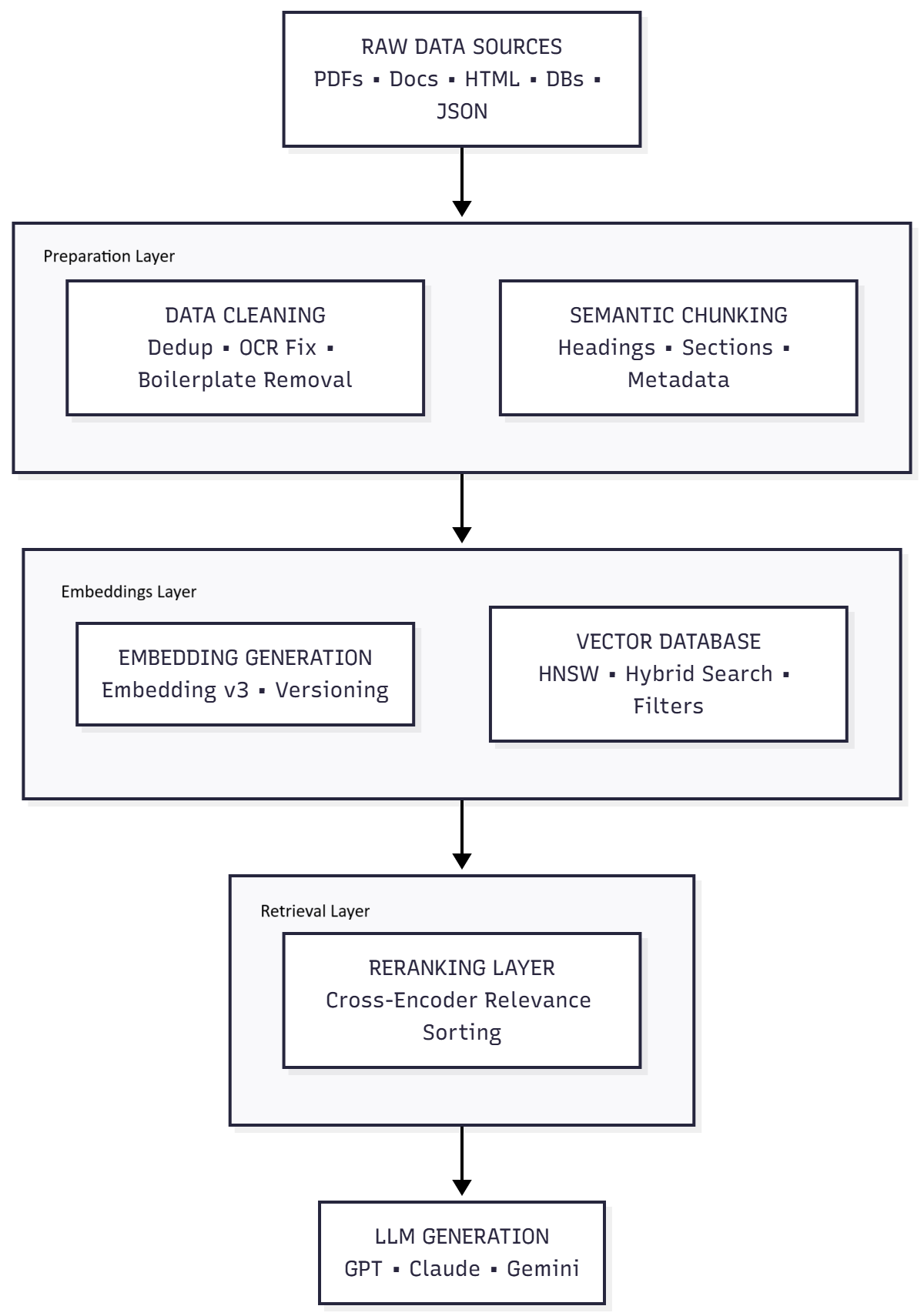
Most AI workloads fail because of one or more data-layer issues:
Scattered or unindexed data sources
Slow vector retrieval or poorly configured databases
Duplicate content confuses vector search engines like Pinecone Vector Database https://www.pinecone.io and open-source systems like Milvus Vector Database https://milvus.io
Convert PDFs properly
Avoid naive PDF-to-text extraction. Use structured extraction (e.g., PyMuPDF or PDFMiner).
Fix OCR errors
Especially for scanned docs. Bad OCR = irrelevant chunks.
Store LLM answers for repeated questions. (Especially in support bots, analytics Q&A, documentation assistants.)
Retrieval caching
Cache vector-store results for common queries.
Chunk caching
Don’t re-embed unchanged documents. Store hash → embedding map.
Step 8: Enforce Embedding Versioning
Never mix embeddings created with different models.
Add metadata:
"embedding_version": "text-embedding-3-large"
This prevents:
Ranking inconsistencies
Retrieval mismatch
Silent accuracy drops
Step 9: Evaluate Retrieval (Not Just LLM Output)
A good RAG system measures:
Precision@k
Recall@k
Coverage
Latency per retrieval step
Token cost reduction
When retrieval is correct, the LLM output becomes consistent and cheap.
Final Result: A Faster, Cheaper, More Reliable AI System
After applying these steps, your pipeline will:
Retrieve faster
Deliver more accurate answers
Reduce hallucinations
Lower token usage by 40–80%
Improve user experience
Scale properly
The model was never the problem. Your data layer was.
Fix the pipeline → your AI suddenly feels 10× smarter.
Subscrible For Weekly Industry Updates and Yugensys Expert written Blogs
More blogs from Artificial Intelligence
Delve into the transformative world of Artificial Intelligence, where machines are designed to think, learn, and make decisions like humans. This category covers topics ranging from intelligent agents and natural language processing to computer vision and generative AI. Learn about real-world applications, cutting-edge research, and tools driving innovation in industries such as healthcare, finance, and automation.
At Yugensys, our team of experts delves into the latest advancements in artificial intelligence, machine learning, and software development, creating comprehensive guides and insightful articles. From algorithmic design and AI-driven data analysis to cloud integration and mobile development, our blog covers a wide range of topics tailored for tech enthusiasts, developers, and businesses alike. Each post is crafted to help readers understand complex concepts, stay updated with industry trends, and gain practical knowledge for implementing cutting-edge technology. Explore our blog to deepen your understanding of AI and unlock the potential of intelligent systems with Yugensys.