Your AI Isn’t Slow. Your Data Is.

Slow AI pipelines aren’t caused by the model—they’re caused by the data layer beneath it. In this guide, we break down the hidden bottlenecks slowing your RAG and LLM applications: poor chunking, missing metadata, unindexed documents, slow vector retrieval, and more. You’ll learn how to redesign your data architecture for faster retrieval, lower token usage, and dramatically better AI performance. If your AI feels slow, this step-by-step blueprint will help you fix it.

Table of Contents

AI system feels slow or unreliable

AI adoption is no longer limited to tech giants. Startups, mid-size enterprises, and large organizations are all integrating 

Teams often blame the model when their AI system feels slow or unreliable: 

“The LLM is taking forever to respond!” 
“The results feel inconsistent.” 
“Token usage is too high.” 
“RAG is not improving accuracy.” 

But in 90% of cases, the model is not the bottleneck 
your data pipeline is. 

You’re driving a Ferrari on broken roads. 

This blog will walk you through exactly how to fix those roads — step-by-step — so your retrieval, generation, and costs finally match the quality of your LLM. 

Your AI Isn’t Slow. Your Data Is.

Why Your AI Feels Slow (Even With a Great Model)

Most AI workloads fail because of one or more data-layer issues: 

  • Scattered or unindexed data sources 
  • Slow vector retrieval or poorly configured databases 
  • Giant documents chunked incorrectly 
  • Missing metadata or embeddings 
  • Poor chunking strategy 
  • No caching or no deduplication 
  • Retrieval returning irrelevant or redundant data 


To understand how embeddings work at a foundational level, it helps to refer to the
OpenAI Embeddings Documentation:
https://platform.openai.com/docs/guides/embeddings

LLMs are fast. 
Bad retrieval is slow. 

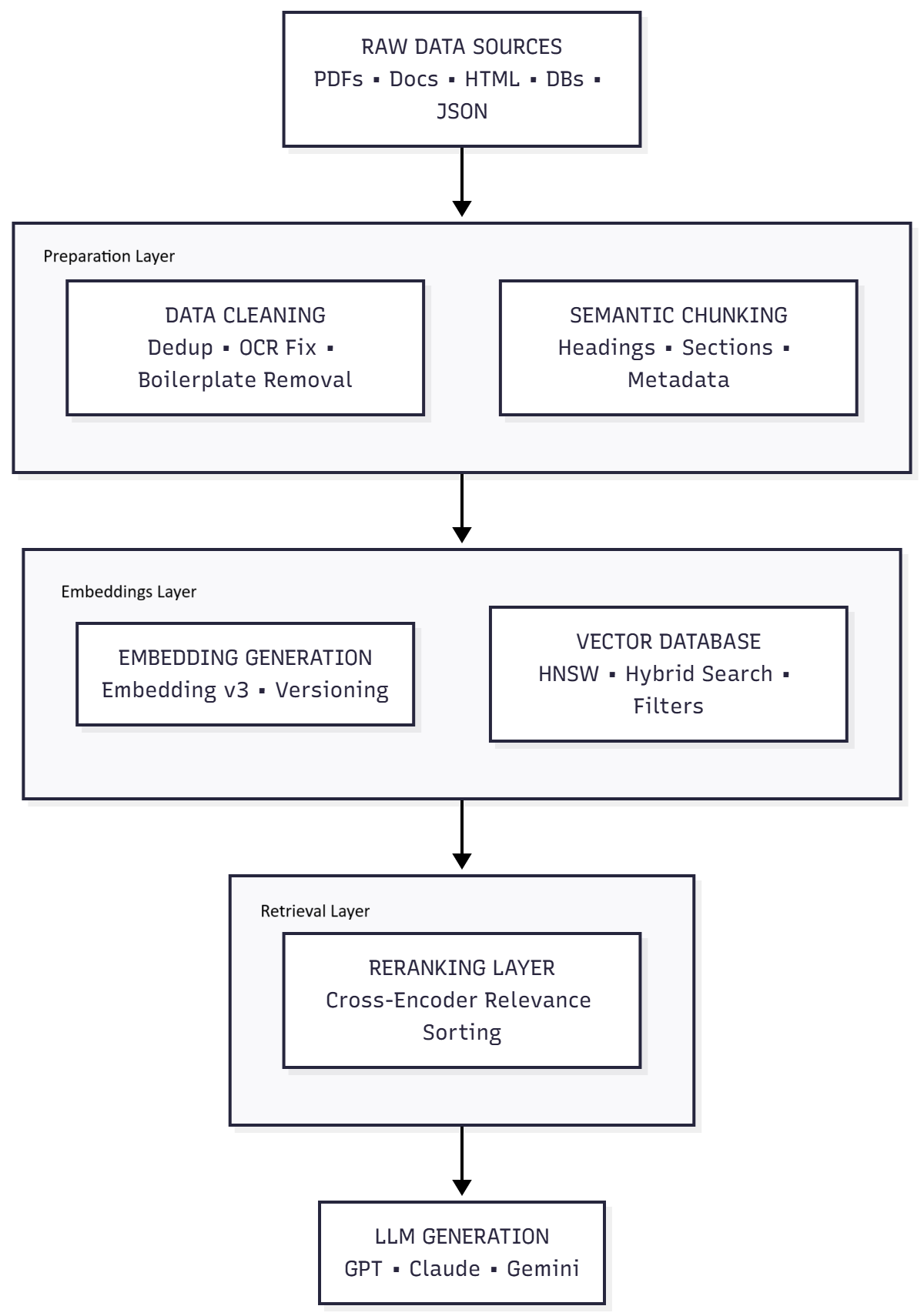
The diagram below shows the full end-to-end flow of a modern, optimized AI pipeline before we dive into detailed steps: 

AI Pipeline Diagram

How to fix it?

Step 1: Map Your Data Landscape

Before optimizing anything, understand what you’re working with. 

Inventory your datasets: 

  • Where does the data live? (filesystems, cloud buckets, SharePoint) 
  • What formats? (PDF, DOCX, HTML, emails, JSON, DB rows) 
  • How frequently does it change? 
  • How many total documents? 


Create a simple table: 

Dataset 

Format 

Size 

Updated? 

Issues 

Knowledge base 

PDF 

4GB 

Monthly 

Long pages, no metadata 

FAQs 

Markdown 

Small 

Rarely 

Good 

CRM notes 

JSON 

Large 

Daily 

No timestamp sorting 

Contracts 

Scanned PDFs 

Large 

Rarely 

OCR quality weak 

This tells you where quality is leaking before you embed anything. 

Our Services

Book a Meeting with the Experts at Yugensys


Step 2: Clean and Normalize Before Embedding

Embedding garbage → retrieving garbage. 

Key preprocessing steps: 

  1. Deduplicate documents

Duplicate content confuses vector search engines like Pinecone Vector Database
https://www.pinecone.io
and open-source systems like Milvus Vector Database
https://milvus.io

  1. Convert PDFs properly

Avoid naive PDF-to-text extraction. 
Use structured extraction (e.g., PyMuPDF or PDFMiner). 

  1. Fix OCR errors

Especially for scanned docs. 
Bad OCR = irrelevant chunks. 

  1. Remove boilerplate

Headers, footers, page numbers, disclaimers add noise. 

  1. Split documents semantically

Not by random token count. 

Use: 

    • Headings 
    • Paragraphs 
    • Table boundaries 
    • Section-level context 
    • Hierarchical chunking (parent-child relationships) 

The rule: 

Your chunk should contain enough meaning to stand alone. 

Step 3: Use Smart Chunking (Your Biggest Lever)

Chunking determines your entire retrieval quality.

Bad chunking → noisy retrieval
Good chunking → precise, relevant RAG

Tools like LangChain’s RAG Guide outline best practices for chunking and retrieval pipelines:
https://python.langchain.com/docs/use_cases/question_answering/

Use hierarchical metadata such as:

  • title

  • section

  • subsection

  • page

Recommended chunk size: 150–400 tokens
Add metadata like:

  • source_file

  • topic

  • author

  • timestamp

  • embedding_version

This step alone improves retrieval more than any hardware upgrade.

Step 4: Add Metadata (Don’t Rely on Embeddings Alone)

Retrieval = vector similarity + metadata filters + keyword search

Metadata is crucial when using vector databases such as:

Good metadata allows your queries to be FAST and ACCURATE. 

Examples of useful metadata fields: 

  • Date / version 
  • Category 
  • Section title 
  • Document type 
  • Tags 
  • Confidence scores (OCR, parsing) 


Example filter: 

     Filter:  
{ 
  "document_type": "policy", 
  "effective_year": { "$gte": 2023 } 
}    

Filtering removes 80% irrelevant chunks before vector search begins.

Step 5: Tune Your Vector Store (Most Teams Skip This)

Your vector DB is NOT configured optimally out of the box. 

Key parameters to tune: 

Parameter 

Why It Matters 

Top-k 

Too high → noisy results; Too low → missing context 

Distance metric 

cosine vs dot product affects similarity ranking 

Index type 

HNSW, IVF-PQ, disk-based vs memory-based 

Merging strategy 

Many small indexes slow retrieval 

Filters before vectors 

Faster + more accurate 

Practical recommendations: 

  • Start with top_k = 3–5 
  • Use cosine similarity for general text 
  • Enable hybrid search (keyword + embeddings) 
  • Use HNSW index for fast recall 
  • Periodically rebuild indexes to avoid fragmentation 

Step 6: Use Reranking to Fix Retrieval Quality

Even with good embeddings, top_k may include mediocre chunks. 

Add a reranking model (e.g., BAAI/bge-reranker or Cohere Rerank) to reorder results based on semantic closeness. 

Why reranking matters: 

  • Embeddings → find roughly relevant items 
  • Reranker → precisely orders them 

Massive quality boost for: 

  • Legal 
  • Medical 
  • Financial documents 
  • Long-form knowledge bases 

Step 7: Cache Aggressively (Reduce Cost + Latency)

Two caching layers matter: 

  1. Query caching

Store LLM answers for repeated questions. 
(Especially in support bots, analytics Q&A, documentation assistants.) 

  1. Retrieval caching

Cache vector-store results for common queries. 

  1. Chunk caching

Don’t re-embed unchanged documents. 
Store hash → embedding map. 

Step 8: Enforce Embedding Versioning

Never mix embeddings created with different models. 

Add metadata: 

"embedding_version": "text-embedding-3-large" 

This prevents: 

  • Ranking inconsistencies 
  • Retrieval mismatch 
  • Silent accuracy drops 

Step 9: Evaluate Retrieval (Not Just LLM Output)

A good RAG system measures: 

  • Precision@k 
  • Recall@k 
  • Coverage 
  • Latency per retrieval step 
  • Token cost reduction 


When retrieval is correct, the LLM output becomes consistent and cheap. 

Final Result: A Faster, Cheaper, More Reliable AI System

After applying these steps, your pipeline will: 

  • Retrieve faster 
  • Deliver more accurate answers 
  • Reduce hallucinations 
  • Lower token usage by 40–80% 
  • Improve user experience 
  • Scale properly 


The model was never the problem. 
Your data layer was. 

Fix the pipeline → your AI suddenly feels 10× smarter. 

Vaishakhi Panchmatia

As the Tech Co-Founder at Yugensys, I’m driven by a deep belief that technology is most powerful when it creates real, measurable impact.
At Yugensys, I lead our efforts in engineering intelligence into every layer of software development — from concept to code, and from data to decision.
With a focus on AI-driven innovation, product engineering, and digital transformation, my work revolves around helping global enterprises and startups accelerate growth through technology that truly performs.
Over the years, I’ve had the privilege of building and scaling teams that don’t just develop products — they craft solutions with purpose, precision, and performance.Our mission is simple yet bold: to turn ideas into intelligent systems that shape the future.
If you’re looking to extend your engineering capabilities or explore how AI and modern software architecture can amplify your business outcomes, let’s connect.At Yugensys, we build technology that doesn’t just adapt to change — it drives it.

Subscrible For Weekly Industry Updates and Yugensys Expert written Blogs


More blogs from Artificial Intelligence

Delve into the transformative world of Artificial Intelligence, where machines are designed to think, learn, and make decisions like humans. This category covers topics ranging from intelligent agents and natural language processing to computer vision and generative AI. Learn about real-world applications, cutting-edge research, and tools driving innovation in industries such as healthcare, finance, and automation.


Expert Written Blogs

Common Words in Client’s testimonial